
If you sell second-hand items online, storage becomes a problem faster than you expect.
At the start, it feels easy. You have a few items listed on eBay. Maybe some clothes, a pair of shoes, a few games, a jacket or two. You remember where everything is because there is not much to remember.
Then you keep sourcing.
A few items becomes 20. Then 50. Then 100.
Eventually, something sells and you realise you have no idea where it is.
That is when you need a simple storage system.
The good news is that reseller storage does not need to be complicated. You do not need a warehouse. You do not need expensive shelving. You do not need a perfect barcode system.
You just need to know where each listed item is.
The goal of a storage system
A good storage system only needs to answer one question:
When this item sells, where do I find it?
That is it.
The system does not need to describe the item. Your eBay listing already does that.
It does not need to track every tiny detail. Your photos, title and description already help with that.
The storage system just needs to point you to the right place.
If an item sells and you can quickly find it, the system is working.
If you have to dig through five boxes, check the garage, search the spare room and hope for the best, the system is not working.
My simple tub system
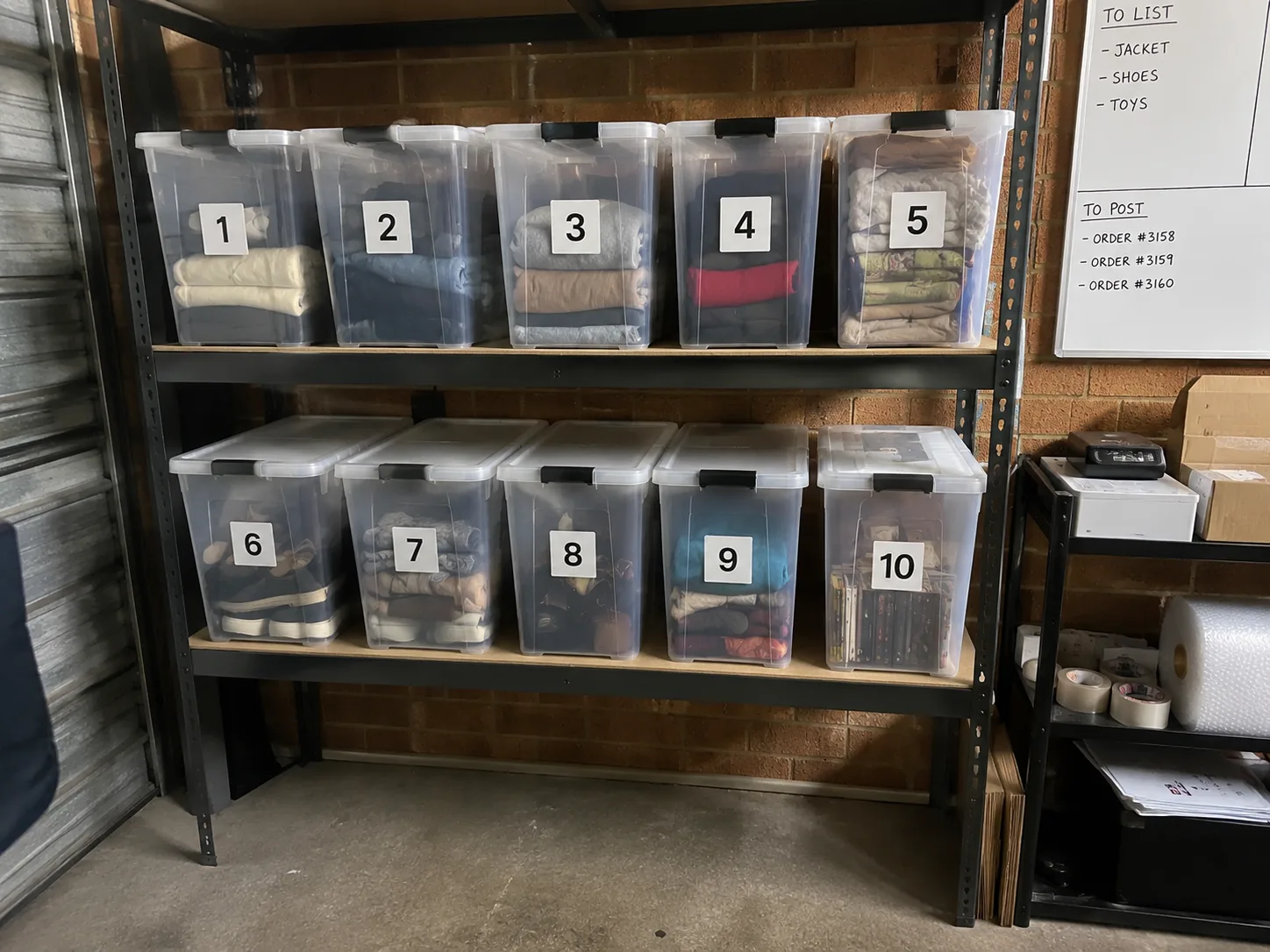
The easiest storage system I have found is numbered tubs.
I have tubs labelled:
1 to 10
Whenever I list an item, I put it into whichever tub has room.
Then, in the eBay custom label or SKU field, I write the tub number.
For example:
Tub 1
That is the whole system.
When the item sells, I check the custom label, go to Tub 1, and find the item.
It is simple, but that is why it works.
Why numbered tubs work so well
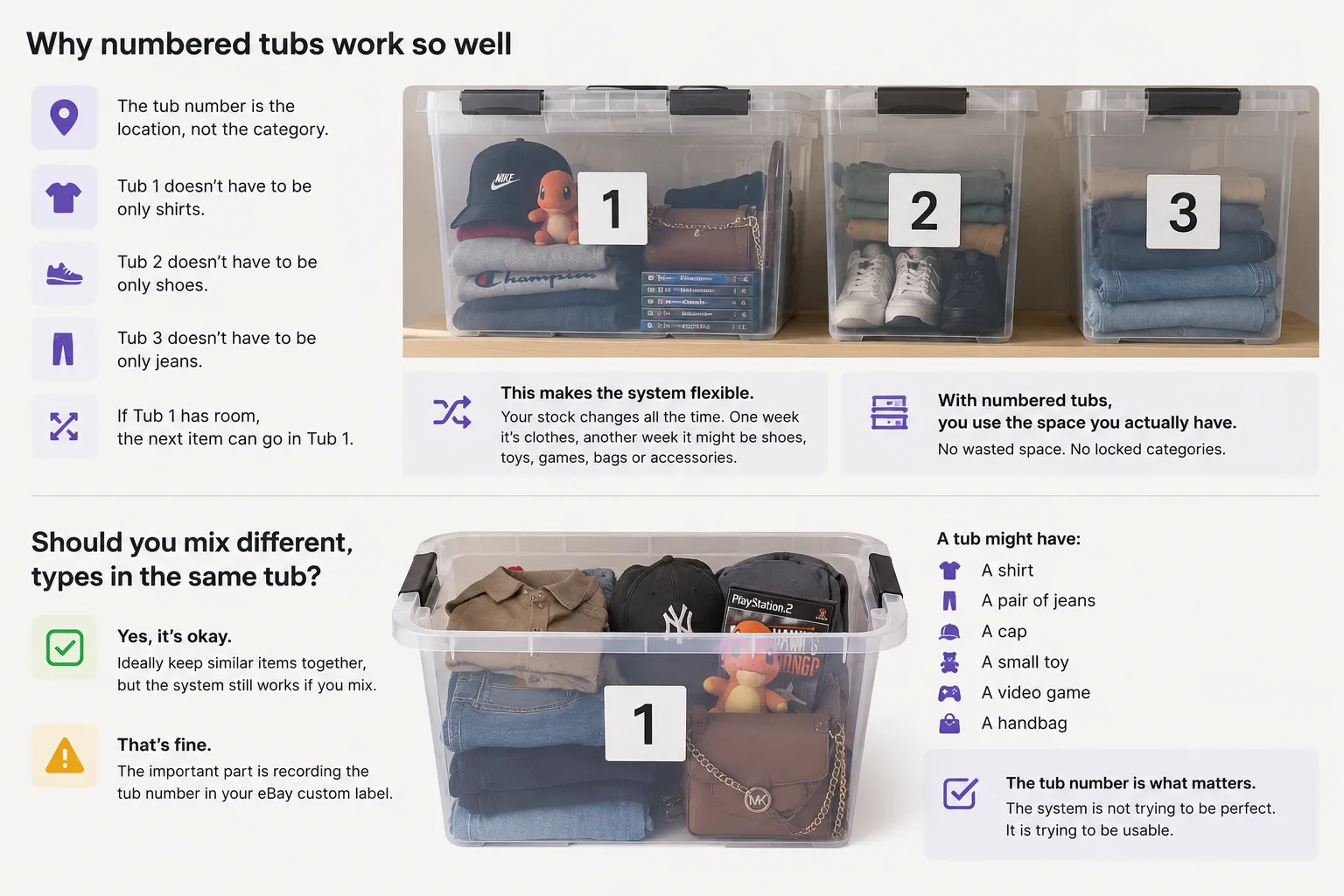
The best part of this system is that the tub number is the location, not the category.
That means Tub 1 does not have to be only shirts.
Tub 2 does not have to be only shoes.
Tub 3 does not have to be only jeans.
If Tub 1 has room, the next item can go in Tub 1.
This makes the system flexible.
That matters because reseller stock changes all the time. One week you might source mostly clothing. Another week you might find shoes, toys, video games, bags or accessories.
If every tub is locked to one category, you can run out of room in one tub while other tubs are half empty.
With numbered tubs, you use the space you actually have.
Should you mix different item types in the same tub?
Ideally, it is better not to mix too much.
If you can keep clothing with clothing, shoes with shoes and fragile items separate, that is usually easier.
But the important thing is that the system does not fall apart if you do mix items.
A tub might have:
- A shirt
- A pair of jeans
- A cap
- A small toy
- A video game
- A handbag
That is okay, as long as every item in that tub is recorded correctly in the eBay custom label.
The tub number is what matters.
The system is not trying to be perfect.
It is trying to be usable.
How to use the eBay custom label field
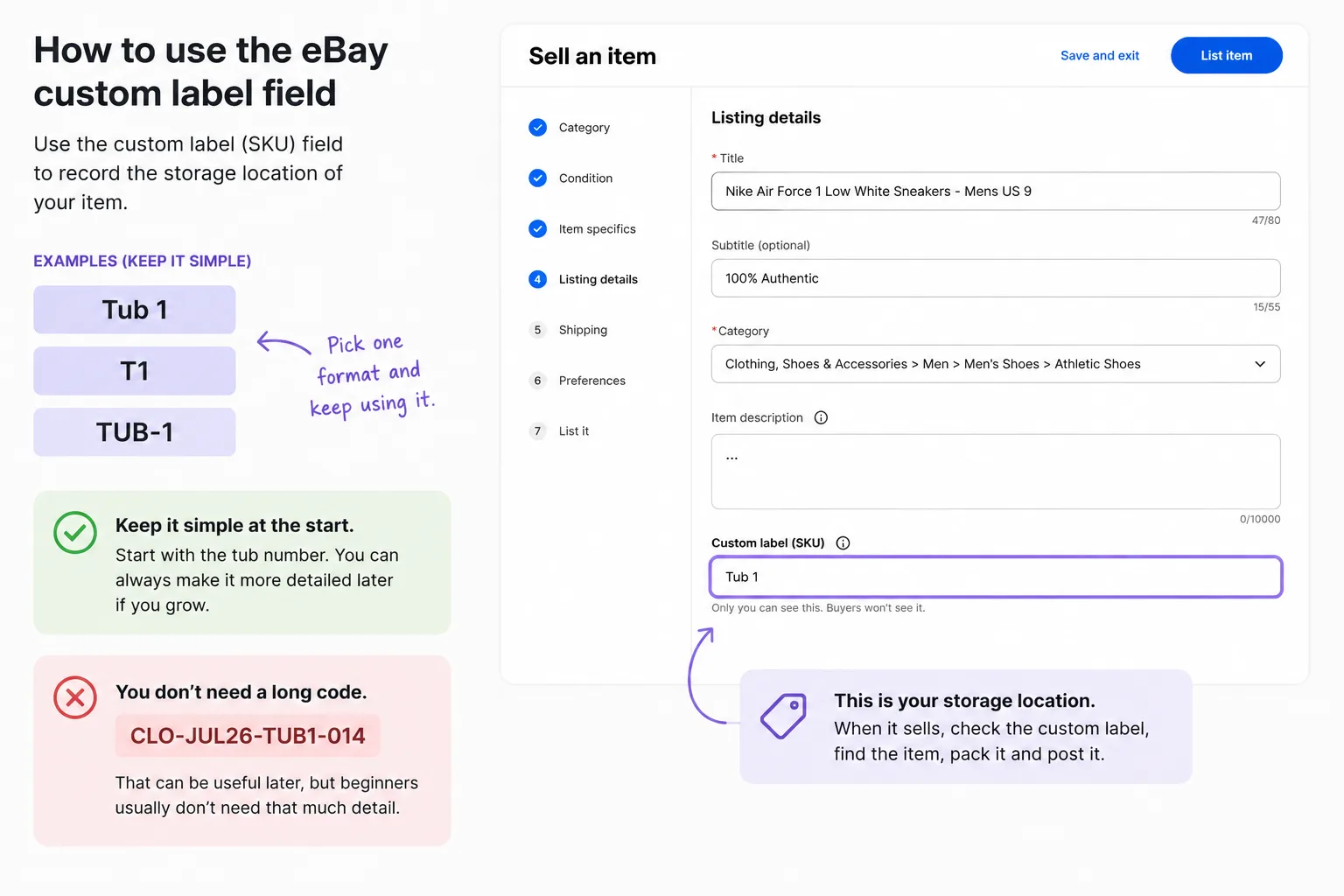
When you create or revise an eBay listing, use the custom label or SKU field to record the storage location.
For example:
Tub 1
or:
T1
or:
TUB-1
Pick one format and keep using it.
I would keep it simple at the start.
You do not need a long code like:
CLO-JUL26-TUB1-014
That can be useful later, but beginners usually do not need that much detail.
Start with the tub number.
You can always make the system more detailed later if you grow.
Simple storage workflow
Here is the full workflow:
- Photograph the item.
- Create the eBay listing.
- Choose a tub with space.
- Put the item in that tub.
- Add the tub number to the eBay custom label field.
- When the item sells, check the tub number.
- Find the item, pack it and post it.
That is all you need.
The key is to add the tub number at the same time you list the item.
Do not tell yourself you will update it later.
That is how items get lost.
Example
You list a Ralph Lauren shirt.
Tub 4 has room.
You fold the shirt, put it in Tub 4, and add this to the eBay custom label:
Tub 4
Two weeks later, the shirt sells.
You open the order, check the custom label, see Tub 4, and go straight to the right tub.
No guessing.
No searching through every box.
No panic.
Why this is better than relying on memory
Memory is fine when you have 10 items.
It is not fine when you have 100.
Once you start listing regularly, items blur together.
You might remember photographing the item. You might remember listing it. You might even remember seeing it recently.
But that does not mean you know where it is.
A tub system removes the guessing.
The listing tells you where the item is.
Do you need item numbers?
At the start, probably not.
If you only have 10 tubs and each tub is manageable, the tub number alone may be enough.
But if your tubs start getting very full, you can add item numbers later.
For example:
Tub 1 - 014
This means the item is in Tub 1 and is item number 014.
You could write that number on a small sticker, bag or tag if needed.
But do not start there unless you actually need it.
The best beginner system is the one you will actually keep using.
Do you need bags inside the tubs?
For clothing, bags can help.
You can fold each item and place it into a clear bag before putting it in the tub. This keeps the item clean and makes the tub easier to sort through.
But bags are optional.
If you are just starting, numbered tubs are more important than making every item look perfectly packed.
A simple setup might be:
- Clothing folded neatly in tubs
- Shoes kept together in pairs
- Fragile items wrapped before storage
- Small items placed in smaller bags or containers
The goal is to protect the item and make it easy to find.
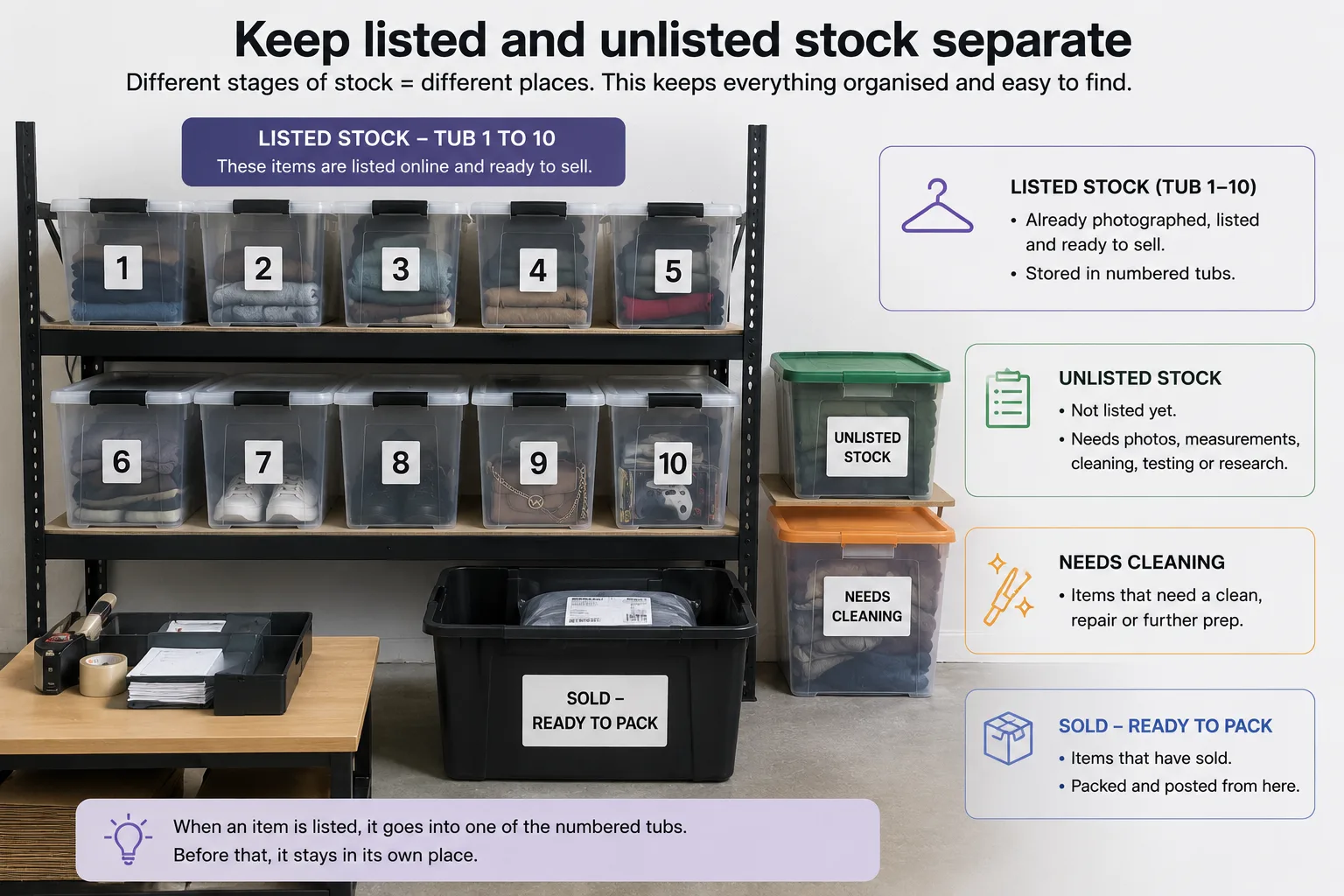
Keep listed and unlisted stock separate
This is one of the biggest rules.
Do not mix listed stock with unlisted stock.
Listed stock is stock that is already online and ready to sell.
Unlisted stock is stock that still needs photos, measurements, cleaning, testing or research.
If you mix them together, it becomes confusing.
A simple setup could be:
- Tub 1-10: listed stock
- One separate tub: unlisted stock
- One separate tub: needs cleaning
- One separate area: sold items ready to pack
This keeps the process clear.
When an item is listed, it goes into a numbered tub.
Before that, it stays somewhere else.
Keep sold items out of the tubs
Once an item sells, remove it from the tub and pack it.
Do not leave sold items sitting in the listed stock area.
That creates confusion, especially if you sell on more than one platform.
A good habit is to have a small sold and ready to pack area.
That way, sold items are separate from active stock.
What about cross-listing to Depop?
If you sell the same item on eBay and Depop, storage becomes even more important.
The same physical item might have:
- One eBay listing
- One Depop listing
- One storage location
The storage location should stay the same.
For example:
Tub 3
If the item sells on eBay, you need to find it quickly and make sure the Depop listing is removed.
If it sells on Depop, you need to find it quickly and make sure the eBay listing is ended.
This is why cross-listing works best when your stock is organised.
You do not want to sell something on one platform and then realise you cannot find it.
How Listalong fits in
Listalong helps Australian resellers cross-list an existing eBay or Depop listing to the other marketplace automatically, or choose items themselves, without doing everything twice.
A simple storage system makes that workflow easier.
The workflow can look like this:
- Source the item.
- Photograph it.
- List it properly on eBay.
- Put it in a numbered tub.
- Add the tub number to the eBay custom label.
- Cross-list suitable fashion items to Depop.
- Keep the listings synced.
- Pack and post quickly when it sells.
Listalong helps with the online side.
Your tub system helps with the physical stock side.
Together, they make reselling much less messy.
Common storage mistakes
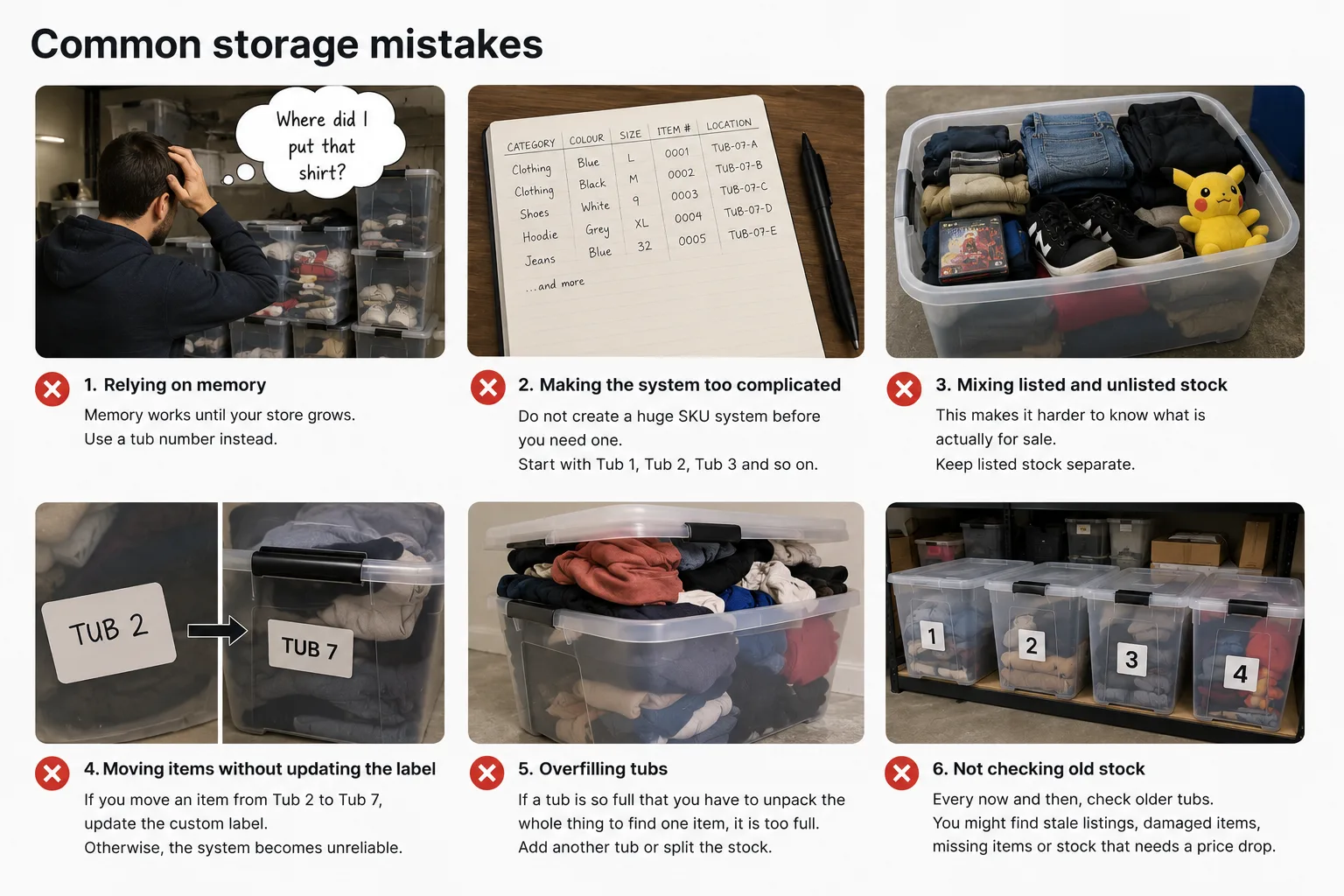
Relying on memory
Memory works until your store grows.
Use a tub number instead.
Making the system too complicated
Do not create a huge SKU system before you need one.
Start with Tub 1, Tub 2, Tub 3 and so on.
Mixing listed and unlisted stock
This makes it harder to know what is actually for sale.
Keep listed stock separate.
Moving items without updating the label
If you move an item from Tub 2 to Tub 7, update the custom label.
Otherwise, the system becomes unreliable.
Overfilling tubs
If a tub is so full that you have to unpack the whole thing to find one item, it is too full.
Add another tub or split the stock.
Not checking old stock
Every now and then, check older tubs.
You might find stale listings, damaged items, missing items or stock that needs a price drop.
Simple weekly storage routine
You do not need to reorganise your stock every day.
A simple weekly routine is enough.
Once a week:
- Check that sold items have been removed from tubs.
- Put newly listed items into numbered tubs.
- Make sure each new listing has a tub number.
- Move unlisted items out of listed stock areas.
- Check if any tubs are getting too full.
- Review a few older listings that have not sold.
This keeps the system under control.
When should you upgrade the system?
Start simple.
Only upgrade when the current system stops working.
You might add item numbers if:
- Your tubs are too full.
- You are spending too long finding items.
- You have hundreds of listings.
- You have multiple people helping you.
- You want better stock tracking.
A more detailed SKU might look like:
TUB1-014
or:
JUL26-TUB1-014
or:
CLO-TUB1-014
But for most beginners, this is not needed straight away.
A tub number is enough to get started.
Final thoughts
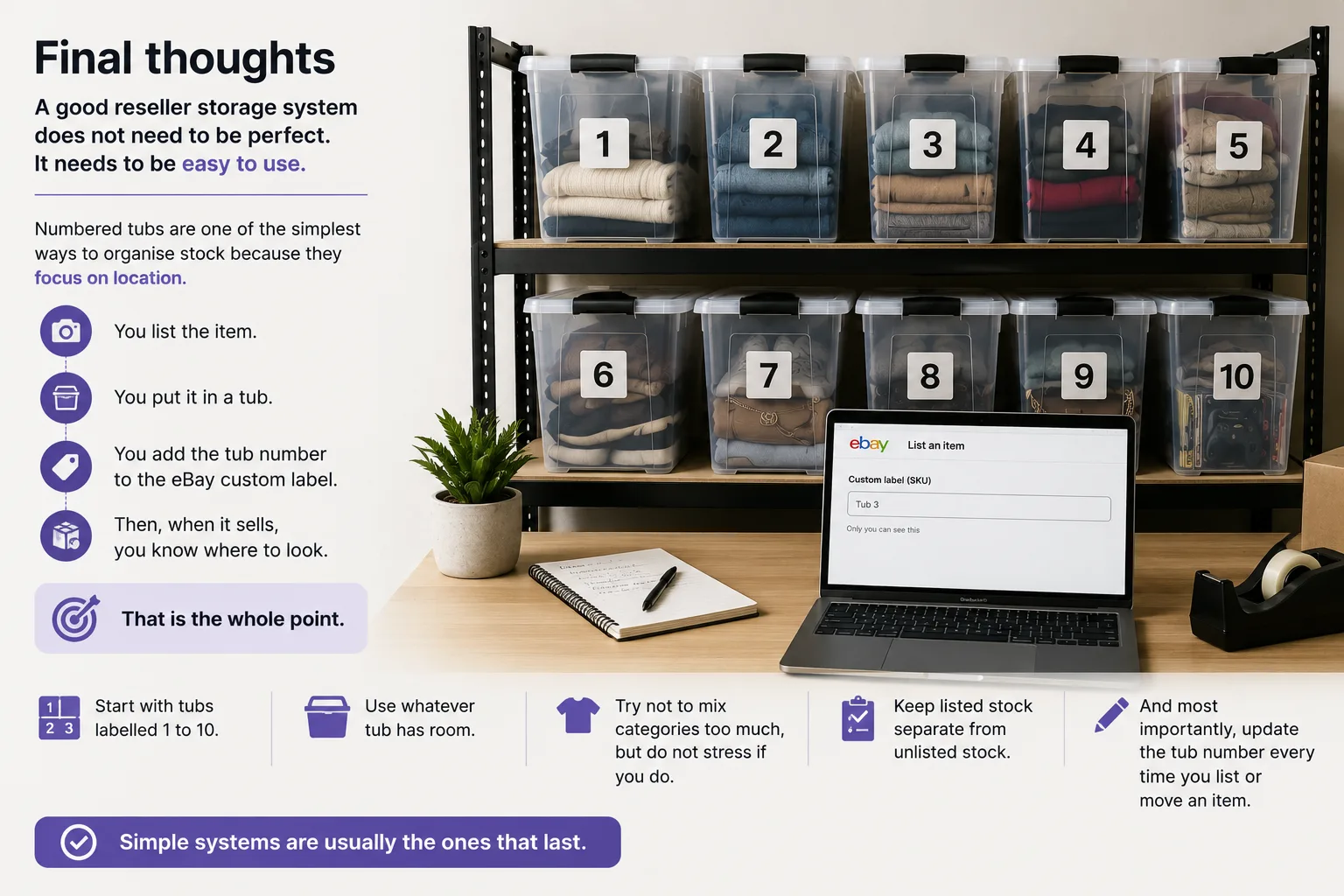
A good reseller storage system does not need to be perfect.
It needs to be easy to use.
Numbered tubs are one of the simplest ways to organise stock because they focus on location.
You list the item.
You put it in a tub.
You add the tub number to the eBay custom label.
Then, when it sells, you know where to look.
That is the whole point.
Start with tubs labelled 1 to 10.
Use whatever tub has room.
Try not to mix categories too much, but do not stress if you do.
Keep listed stock separate from unlisted stock.
And most importantly, update the tub number every time you list or move an item.
Simple systems are usually the ones that last.
FAQ
What is the easiest storage system for beginner resellers?
A numbered tub system is one of the easiest places to start. Label tubs 1 to 10, place listed items into whichever tub has room, and record the tub number in your listing or custom label field.
Should each storage tub be a different category?
Not necessarily. The tub number is the location, not the category. Keeping similar items together can help, but the system still works if a tub contains mixed items as long as each listing has the right tub number.
Where should I record an eBay storage location?
Use the eBay custom label or SKU field. Start with a simple format such as Tub 1, T1 or TUB-1, then keep using the same format.
Should listed and unlisted stock be stored together?
No. Keep listed stock separate from unlisted stock, cleaning piles and sold items ready to pack. Mixing these stages makes it harder to know what is actually available to sell.
When should I upgrade from tub numbers to item numbers?
Upgrade only when the simple system stops working. Add item numbers if tubs are too full, you have hundreds of listings, finding items is taking too long, or more than one person is helping with stock.