
You might already have a listing routine that works. Photograph a batch of stock, measure it, write the details in eBay or Depop, then put each item into storage. The last thing you need is another place to recreate that work.
Listalong lets you keep creating listings on eBay or Depop and crosslist suitable items to the other marketplace. You choose whether to send items automatically or select them yourself.
There is still an initial setup and a few controls to learn. But you do not have to move your everyday listing routine into a replacement catalogue before you can start.
Another place to sell.
Start on eBay or Depop. Reuse the product information you have already entered, choose what to crosslist and keep the matching listings linked.
What stays the same, and what Listalong adds
| Your task | What stays familiar | Where Listalong helps |
|---|---|---|
| Photographing stock | Use your own product photos | Reuses available photos when crosslisting |
| Creating a listing | Start in eBay or Depop as usual | Uses supported source details for the other marketplace |
| Choosing stock | Decide where each item belongs | Offers automatic crosslisting or individual and group selection |
| Preparing the destination listing | Check accuracy, suitability and postage | Flags destination requirements that need attention |
| Handling a sale | Pack and fulfil the actual order | Normally ends the matching linked listing within minutes |
You remain responsible for the item and its listing. The useful change is spending less time entering the same information twice and checking whether sold stock is still available elsewhere.
If you normally list on eBay
Keep building your eBay listings with the photographs, measurements, item specifics and condition notes you normally include. Once your accounts are connected, Listalong can use that work as the starting point for Depop.
For example, imagine a pair of jeans you have just photographed and listed on eBay. You have already recorded the brand, size, wear and measurements. Crosslisting means using those details for a second listing, then checking that the Depop fields and postage are appropriate.
If you want to review each item, choose it yourself in Listalong. If you regularly list consistent, suitable stock, category rules can handle matching new eBay listings automatically.
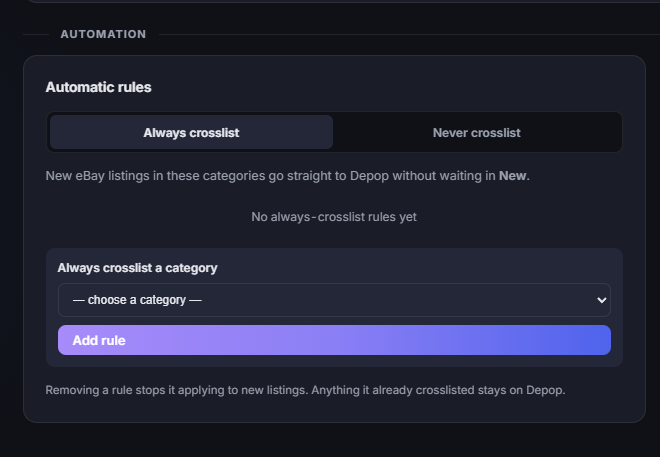
The automatic eBay-to-Depop guide walks through Always crosslist and Never crosslist with screenshots. Those rules apply to matching new listings; use the selection workflow for existing stock you want to send across.
If you normally list on Depop
You can start from the other direction too. Create the listing in Depop, then use Listalong to crosslist suitable stock to eBay automatically or through selection.
You do not need to make eBay your main listing platform just to reach its buyers. Your Depop listing supplies the available product information, and you check anything the eBay destination needs.
An accurate Depop description is a useful starting point, but eBay may need additional item specifics. Review any requirements Listalong flags, and check the finished listing instead of assuming the two marketplaces use identical fields.
See the Depop-to-eBay workflow for that direction in more detail. The eBay category-rule screenshot above illustrates eBay-to-Depop controls; it is not a walkthrough of Depop-side automation settings.
You can start with selected items
Crosslisting does not require sending your entire store to another marketplace. Connect both accounts, choose a small group you understand and check the resulting listings.
A practical first session is:
- Connect your eBay and Depop accounts. Connecting alone does not publish anything.
- Choose a few items that are suitable for both marketplaces.
- Crosslist them using the selection workflow.
- Open the destination listings and check photos, size, condition, price and postage.
- Decide whether future stock is consistent enough for automatic posting.
This gives you a useful test of the actual work involved. You can see whether the second listing is accurate and whether the controls make sense before applying the workflow more widely.
Keep control over what reaches the other store
An eBay store can contain much more than fashion. A jacket may suit Depop; a games console does not belong there. Keep prohibited stock out of your crosslisting workflow and check each marketplace’s requirements when a category is unfamiliar.
For eBay-to-Depop rules, use Never crosslist for categories you want skipped. Use Always crosslist only where you are comfortable allowing matching new listings to proceed without waiting for individual approval. A broad category can contain exceptions, so manual selection is useful for mixed stock.
Our guide to what you can sell on Depop covers suitability in more detail.
Understand what linked sold-item sync does
When one physical item has two listings, the other listing needs to end after a sale. Listalong’s sold-item sync normally handles that for linked items within minutes, helping reduce the chance of selling the same stock twice.
Keep your marketplace connections working and review items needing attention. A delay is still possible, so resolve a matching listing promptly if you notice it remains available after the item sells.
Sold-item sync is not a promise that every edit is mirrored. If you change a price, replace photos or discover a flaw after crosslisting, check the destination listing too. Treat both descriptions as information a buyer may rely on.
Is it worth adding another subscription?
The useful question is how much repeated work it removes from your own week. During the trial, measure the time you spend crosslisting a batch, correcting destination details and checking linked inventory. Compare that with your previous process.
If you only crosslist occasionally, selection may be enough. If you regularly produce suitable listings, automation may be more useful. Neither approach guarantees extra sales; the value comes from a workable process and another opportunity for buyers to find your stock.
Use the reseller ROI calculator to explore your own time assumptions, then compare them with the current plans. Listalong’s Standard plan is A$19/month and Large Store is A$39/month, with inventory allowances explained on the pricing page.
Keep listing where you feel at home.
Connect eBay and Depop and try a small batch. Your 14-day free trial starts when both marketplaces are connected, with no card required.
Create your Listalong account Want to see the steps first? Explore how Listalong works.