
For an Australian clothing reseller, eBay and Depop are a practical pair to get working well before paying to manage more marketplaces. The right crosslisting software should help you reach buyers on both, keep track of your stock and reduce the repeated work around each sale.
A long list of supported marketplaces looks impressive. What matters for your business is whether the tool handles the places you actually sell, the details your garments need and the way you already work.
I run Listalong and use it with my own eBay and Depop stores. This guide explains the checks I would make when choosing software for a clothing business, including when a tool with more channels could be a better fit.
One manageable routine.
Keep listing where you feel comfortable. Choose software around accurate listings, linked stock and the work you want to remove.
Start with the marketplaces your clothing business needs
eBay gives you structured ways to describe clothing through details such as brand, size, colour and style. Those details help buyers narrow their searches. Depop centres its shopping experience on fashion, including brands, styles and preloved clothing.
That makes them a useful combination to test for stock such as branded jeans, jackets, dresses, sportswear and vintage pieces. Buyers and styles overlap, so avoid assuming that every vintage item belongs on Depop or every practical garment belongs on eBay.
Build your marketplace mix around your own stock and sales results. Start with a manageable routine and use what you learn to decide where to spend your time.
If most of your current orders already come through eBay and Depop, improving those two stores may be more useful than maintaining several extra ones. If your stock needs a specialist audience or you already sell elsewhere successfully, include those channels in your software requirements.
A quick checklist: which tool fits your clothing business?
| What matters | What to ask | What to test with your own stock |
|---|---|---|
| Your existing routine | Can I keep listing on eBay or Depop? | Import a listing you created on the marketplace |
| Clothing accuracy | What happens to sizes, condition and categories? | Check a garment with measurements and a disclosed flaw |
| Bulk crosslisting | Can I select a batch and review exceptions? | Move a small group of suitable items to the other store |
| Automatic posting | Can I control what gets published? | Check category rules and items that need review |
| Sold-item handling | How are matching listings linked and updated? | Check the linked item when a real sale occurs |
| Older stock | Can I refresh listings without losing track of the garment? | Follow an old listing through to its replacement |
| Shipping | Can I prepare eligible orders from both stores together? | Review the export and tracking upload workflow |
| Cost and capacity | Is the price in AUD, and what counts towards the limit? | Compare the allowance with your active wardrobe inventory |
Keep the clothing details that help buyers decide
Clothing is full of details that a generic title cannot capture. A size 12 label, a measured waist and an oversized fit are different pieces of information. An imported US size should not silently become an Australian size.
Before trusting any crosslisting tool with a large batch, check:
- Size: the label, relevant sizing system and measurements are clear.
- Condition: stains, repairs, wear and missing buttons remain disclosed.
- Photos: the correct garment, care label and flaws are visible.
- Category: the destination category describes the actual item.
- Description: useful details survive the move without misleading claims.
- Price and postage: the destination listing makes sense on its own.
Do not let suggested or generated details substitute for checking the item. If the fabric label is missing, do not guess a material just to fill a field.
Our eBay clothing listing requirements guide covers the listing side in more detail. Accurate source listings also make crosslisting easier.
Choose a workflow you can keep using on a busy day
Some sellers want one central editor for every marketplace. Others already have an efficient routine in the eBay or Depop app and want to keep it.
Listalong is built around the second approach. Connect your stores, let your existing eBay and Depop listings import, then crosslist suitable items to the other marketplace. You can work through items individually for review or select a batch.
You do not need to rebuild your whole catalogue in a new listing editor. Connecting your stores also does not mean every imported item should immediately be published everywhere.
When comparing other tools, check their actual import and publishing workflow. Many can import existing listings; the useful question is how much of your ongoing routine you need to change.
Read crosslisting without changing how you list or the practical bulk import guide.
Automate suitable stock and review the exceptions
For a clothing seller, repeated manual approval can become unnecessary once the source listings are consistently ready for the destination marketplace.
Listalong’s eBay-to-Depop category rules let you send new listings in selected categories straight through with Always crosslist. Never crosslist excludes selected categories. Other items can stay in the review workflow.
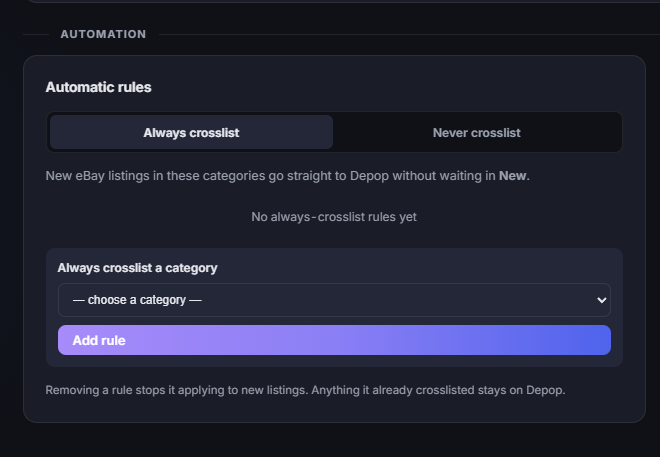
A broad clothing category still needs judgement. Item eligibility, authenticity, descriptions and condition remain your responsibility. Review unusual items and check destination rules before automating a mixed catalogue.
Start with a small batch, inspect the published listings and expand only when the results are right. Follow the automatic eBay-to-Depop setup guide for the detailed workflow.
Treat each garment as one piece of stock
A second storefront gives a one-off jacket another place to sell. It does not give you a second jacket.
Look for software that links the matching listings and handles the other listing after a sale. In Listalong, linked sold-item syncing normally runs within minutes. It is not instantaneous, and it cannot guarantee that two buyers will never order before the update completes.
Check connections and alerts, and investigate exceptions promptly. Existing listings of the same garment need to be correctly linked; similar-looking clothing is not necessarily the same physical item.
Keep a simple stock reference or storage location so you can find the sold garment. Read automatically removing the Depop listing after an eBay sale for the linked-stock workflow.
Make older stock easier to review
A rail of unsold clothing ties up space and money. Software can reduce the administration of refreshing listings, but it cannot fix weak demand or an unrealistic price by itself.
Listalong includes automatic ending and recreation of older eBay listings, with an outcome comparable to Sell Similar. Before putting stock into that routine, review its photos, measurements, condition and comparable sold prices.
Check that the replacement still corresponds to the correct garment and linked listing. Do not choose a tool on a promise that relisting guarantees a search boost.
Our automatic Sell Similar-style relisting guide explains the checks to make.
Count the work after the sale, too
If you sell clothing on both marketplaces, preparing parcels can become another repeated job. It is worth comparing shipping support alongside listing features.
Listalong can prepare eligible unshipped eBay and Depop orders for a bulk upload to Australia Post MyPost Business. You buy the labels there, then upload the label PDF back to Listalong so tracking can be matched to the relevant orders and shipping status updated.
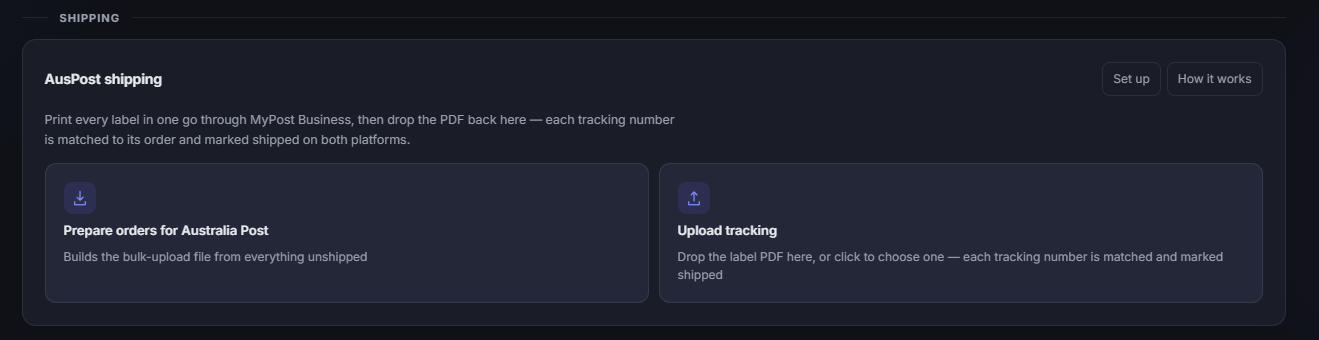
Check the order’s label requirements before including it. Orders that require a marketplace-provided label should follow that marketplace’s instructions. Postage is paid separately from the Listalong subscription.
See printing Australia Post labels for eBay and Depop together for the complete process.
Compare Australian-dollar costs and the right listing allowance
A subscription only makes sense if it removes enough work or helps you operate your stores more effectively. Check the currency, billing period and what the inventory limit measures.
| Listalong plan | Monthly price | Active linked inventory |
|---|---|---|
| Standard | A$19 | Fewer than 1,500 items |
| Large Store | A$39 | 1,500–3,500 items |
Both plans include every current Listalong feature. One physical item linked on both marketplaces counts once. Sold, ended, deleted and historical listings do not use the active allowance. For more than 3,500 active linked items, contact us about capacity.
The 14-day trial starts when both stores are connected, requires no card and does not automatically become a paid subscription. Check current pricing before choosing a plan.
Other tools may count new items added each month, active inventory or feature access differently. Our Australian crosslisting software cost comparison explains those differences and identifies the billing currencies.
When is a broader marketplace tool worth considering?
Choose additional channels because they suit your stock or customers. For example, specialist or luxury clothing may warrant a relevant specialist marketplace; local selling can help with suitable bundles; an independent store may matter if you already bring your own audience.
If those channels are essential to your business, compare tools that support them. Check their Australian availability and exact functionality rather than relying on the marketplace logos on a homepage.
For a seller focused on eBay and Depop, Listalong is worth testing when keeping the existing listing routine, linked-stock handling and combined shipping work are the priorities. For a seller who needs a wider set of channels managed in one system, broader support may outweigh that fit.
Test ten real garments before moving the whole wardrobe
Use ten items you already own: a mixture of straightforward listings and a few that need careful sizes, measurements or condition descriptions.
Check the listing
Import, review and crosslist. Inspect the actual destination listing, including size, condition, photos and postage.
Check the routine
Record the time spent reviewing and correcting the batch. Decide which future items suit automatic posting.
Check the sale
When an item genuinely sells, check its linked listing and the fulfilment process. Keep a record of any exceptions.
A small test will not prove future sales performance. It will show whether the software fits your daily work. Compare the time saved with the subscription, then judge sales over a useful period using actual margins after fees, postage and stock costs.
For an Australian clothing business, getting two relevant stores working smoothly is a sensible place to start. Add more channels when the results justify the extra work.
Try Listalong with your own clothing stock
Connect eBay and Depop, review your imported inventory and start with a manageable batch.
Start your 14-day free trialNo card required. Trial starts when both stores are connected. Standard A$19/month.