
Finding an item listed for $100 doesn’t mean you’ve found something worth $100. It tells you what one seller is asking. Before buying stock, I want to see what comparable items have actually sold for—and whether there is enough demand to justify tying up my money.
Start with comparable sold listings located in Australia. Then check the competition still for sale. If local results are sparse, overseas sales can help with a rough price reference, but they don’t establish how quickly your item will sell here.
Check the demand.
One high sale is a clue. Several comparable sales, current competition and a realistic margin make a stronger buying decision.
Search controls checked 25 September 2026. Screenshots show eBay’s desktop results and iPhone app. Layouts, available filters and results can change. Numerical examples in this guide are illustrative, not results from the pictured search.
Asking prices and sold prices answer different questions
| What you’re looking at | What it can tell you | What it cannot establish |
|---|---|---|
| Active listing | A seller’s current asking price and competing supply | That anyone will pay that amount |
| Sold listing | Evidence of a reported sale for a comparable item | That yours will sell at the same price or speed |
| Completed listing | An ended listing, which may or may not have sold | Demand unless you distinguish sold from unsold |
| Overseas sold listing | A price reference in another market | Australian demand or the original buyer’s postage cost |
Check several comparable results rather than choosing the highest one. A boxed, unused item is not a fair comparison for a worn example missing accessories. If the result says Best Offer accepted, don’t assume the displayed asking price was the accepted amount. eBay Product Research provides actual accepted-offer prices and a longer research window; eBay Australia currently limits access to Pro sellers. eBay Product Research.
Step 1 Start with a specific search
Open eBay Australia and search for your item using the normal search bar. The screenshots use a Levi’s 501 search. It’s a starting point for learning the controls, not a narrow enough comparison to price every pair of 501s.
For your own item, start with its brand, model or style. Add details that materially change its value: size, edition, platform, model number, material or year. Then adjust the search if it is missing obvious matches.
Avoid adding every word from a label at once. An overly precise query can produce no results even when people are buying the product under slightly different titles.
Step 2 Select Sold items and comparable condition
In the search-results sidebar, scroll to Show only and tick Sold items. Completed items alone can include things that ended without selling. Under Condition, choose a suitable condition—for example, Pre-owned for second-hand jeans.
The filter is only the first pass. Two items marked Used can differ significantly. Open promising matches and inspect their photographs, description, size and included parts before recording the price.
Step 3 Choose Australia only under Item location
In the same sidebar, find Item location and select Australia only. Check that both this option and Sold items remain selected in the updated results.
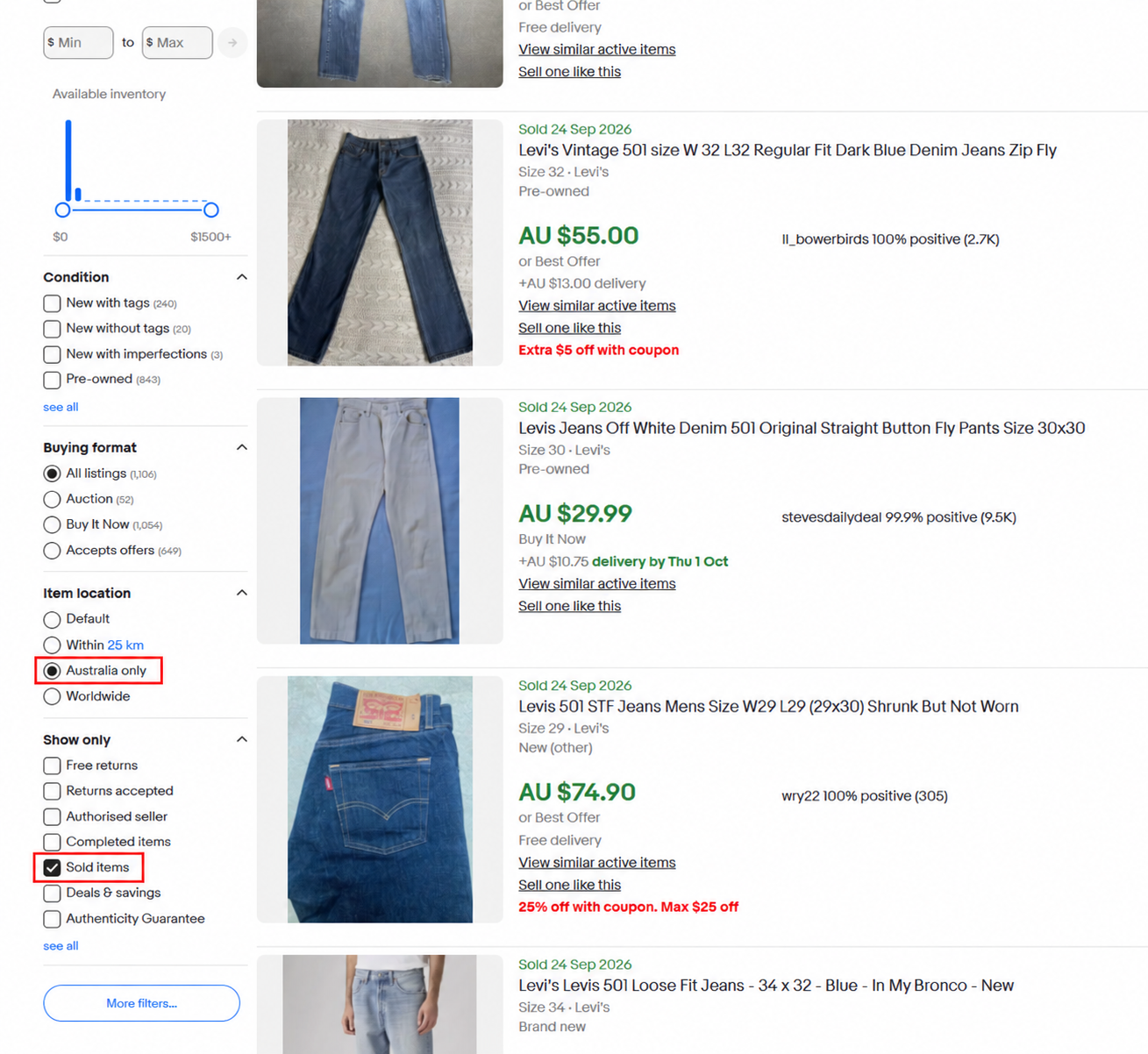
Using ebay.com.au alone does not mean every result is located in Australia. Choose Australia only explicitly rather than leaving the location on Default or Worldwide.
Australia only is an item-location filter. It does not reveal the buyer’s country. An Australian-located item might have been purchased by someone overseas. It is still a useful local-stock comparison, but don’t describe the results as a count of Australian buyers.
eBay may ask you to sign in before showing sold results. After searching, check the applied location, condition and sold filters again before taking any counts. eBay Advanced search help.
Step 4 Compare the actual item, not just the title
For clothing, check the fit, tagged size, measurements, age, fabric, wear and alterations. A modern pair of jeans, a desirable vintage version and a damaged pair can appear in the same broad search.
For other categories, look for differences such as:
- Games and DVDs: region, edition, disc condition and whether the case or manual is included.
- Electronics: exact model, tested status, accessories and faults.
- Collectables: original versus reproduction, completeness and condition.
- Shoes: size, sole wear, damage and authenticity information.
Exclude bundles, unrelated accessories and parts-only listings unless that is what you are buying. Look at the sale dates too: several recent matches are more useful for today’s decision than one exceptional older sale.
Use a realistic range. If several genuinely comparable items sold around $25–$35, a lone $90 result needs explaining before it becomes your target price.
Step 5 Sort highest first to spot valuable versions
Another useful check is to open the sort menu and choose Price + postage: highest first. I like this view for spotting versions worth investigating: a particular vintage label, rare edition, unusual material or complete set might explain why one example sold for more.
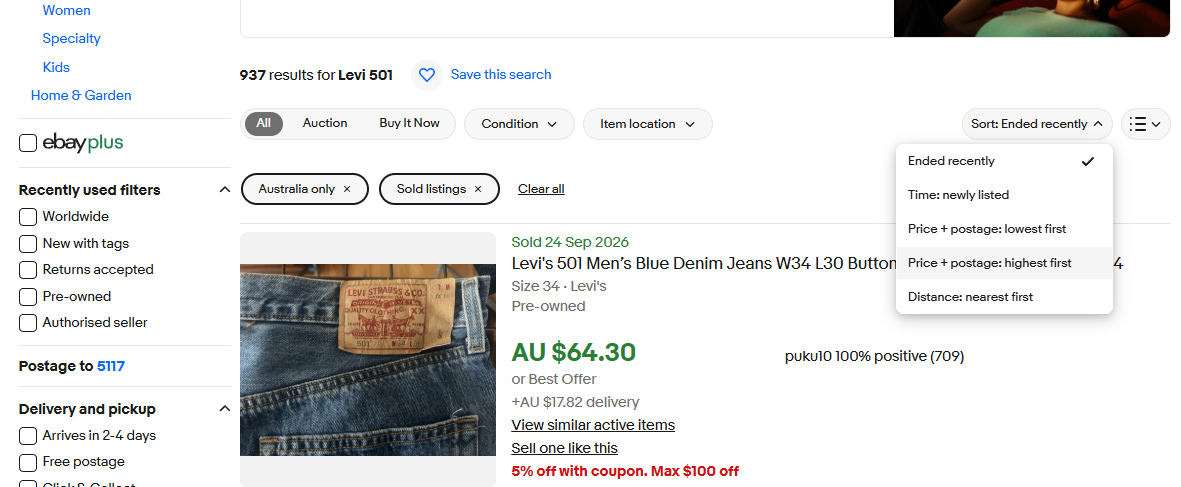
Use the expensive results to learn what makes those items different, then look for several sales that match the stock you are considering. A rare vintage pair of jeans or a bundle should not set the expected price for an ordinary single pair. Check accepted-offer uncertainty too.
The sort includes postage, so the first result is not necessarily the highest item price. This matters especially when looking worldwide: a large international delivery quote can push an item up the results. Compare the item prices separately, as explained below, and switch back to Ended recently to check how current your comparisons are.
On your phone: search sold items and lock your filters
The eBay app is useful when you’re checking stock while you’re out. Search for the item, then tap Filter above the results. Set Item location → Australia only, turn Sold items on and choose a comparable condition. Tap Show results to apply your choices; the button includes the current result count.
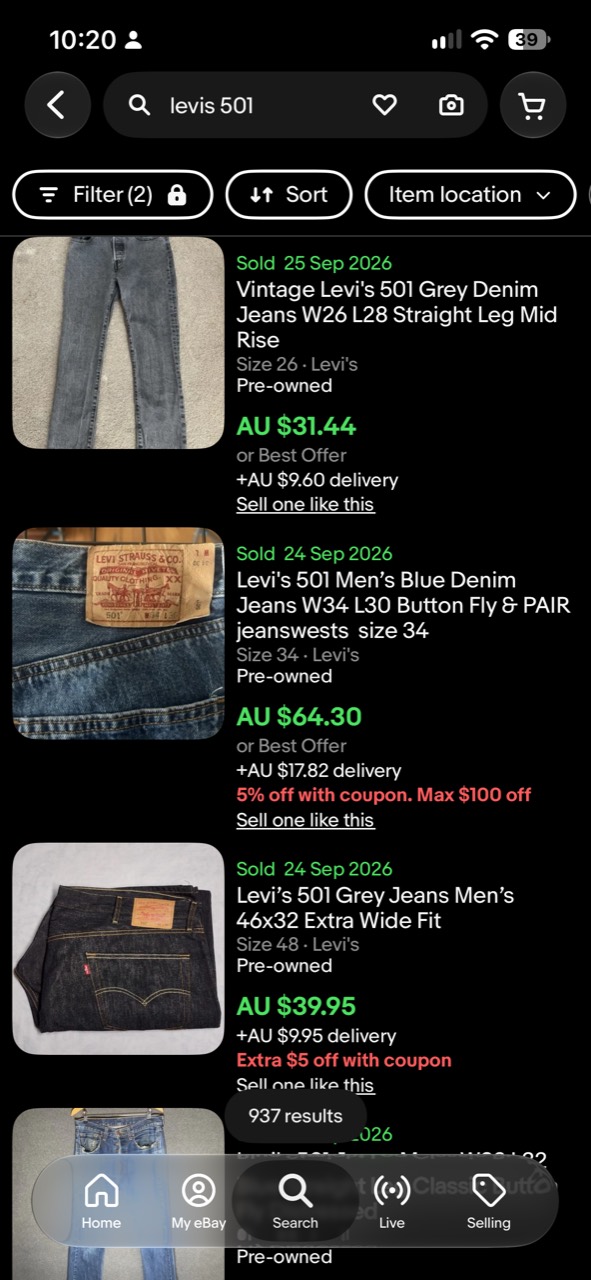
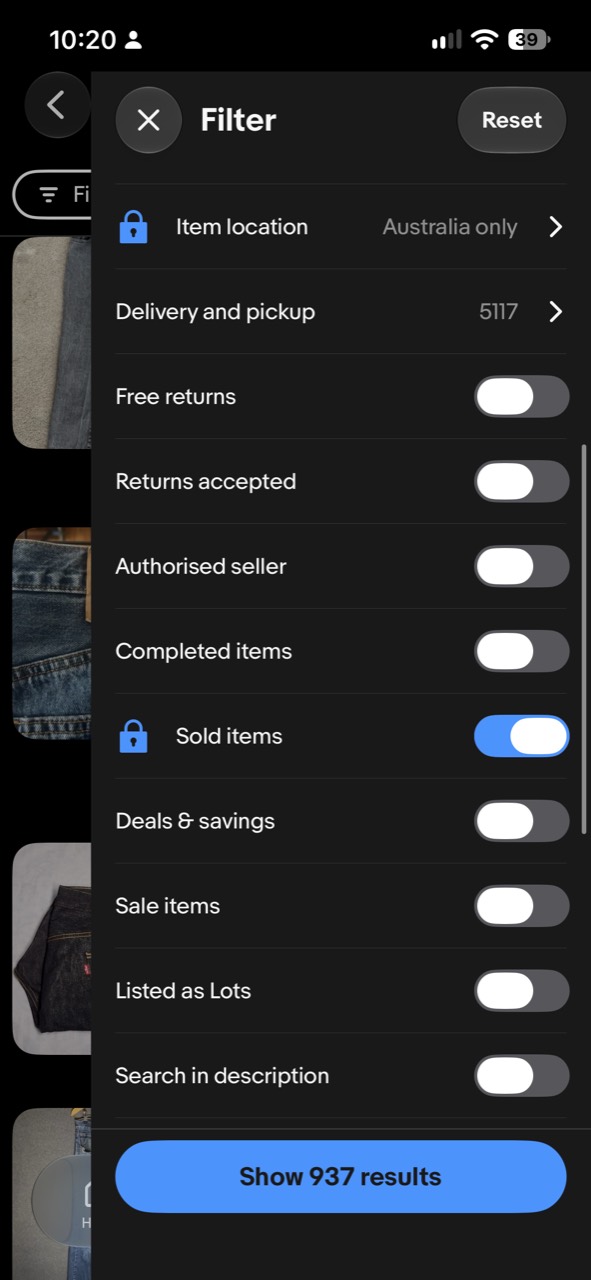
Keep Australia only and Sold items selected for your next search
Lockable filters let you keep chosen settings for future searches, so you can research the next item without setting everything again. To enable them, open Filter → Customise → Lockable filters. The wording or placement may vary by app version. eBay’s app guide.
Once enabled, set the filters you want and tap the padlock beside each one to lock it. In the screenshot, Item location: Australia only and Sold items both have blue closed padlocks. The lock retains a setting; the separate Sold items switch determines whether that filter is on.
This is handy for working through several items at an op shop or checking a pile of potential stock. Change the search words, then confirm that Australia only and Sold items are still applied before comparing prices. Keep checking condition too: a locked location does not make every result comparable.
Remember to unlock filters when you change tasks. To count active competition, unlock Sold items and turn it off, ensuring Completed items is off too. To research overseas sales, unlock Item location and choose Worldwide. Restore Australia only when you return to local comparisons.
No Australian sold results? Try overseas prices carefully
First check the search itself. Remove unnecessary words, try an alternate model name, loosen one filter at a time and check whether the category is hiding relevant items. Standard sold searches cover the previous 90 days; Product Research can look back up to three years if you have access through a Pro plan. eBay research tools.
If there are still no useful Australian matches, change Australia only to Worldwide, keeping the sold and comparable-condition filters. Use the overseas results as a second source of evidence.
An overseas sale can suggest that an item has value. It doesn’t show that there is an equally active market in Australia. Compare the exact version, language, region, voltage or sizing system where relevant, and put all item prices into the same currency.
For example, repeated overseas sales around the equivalent of A$60 may justify investigating an unusual item further. They don’t justify assuming a quick A$60 Australian sale. I’d allow more room for negotiation, a longer holding period and the possibility that the local buyer pool is small.
No local sold results can be consistent with low local sell-through, but it isn’t proof on its own. It can also mean scarce supply, an overly narrow search, missing data or a product that sells infrequently. If you cannot establish demand, treat the purchase as more speculative and set your buying price accordingly.
Disregard the displayed international postage when estimating item value
Keep the overseas item price and the displayed international shipping charge separate. Don’t add that postage figure to the item price and call the total its resale value in Australia.
The delivery amount shown to you may relate to shipping to your current location. It is not reliable evidence of what the original buyer paid for postage; they may have lived in the seller’s own country. eBay’s delivery displays depend on the listing and delivery destination. eBay postage guidance.
Suppose a result displays an item price equivalent to A$45 plus A$38 international postage. Use A$45 as a tentative item-price comparison, subject to condition and any accepted-offer uncertainty. It is not evidence that the item itself is worth A$83 locally.
This doesn’t mean postage never matters. If delivery was included in the sale price, that can affect comparability too. And for your own listing you still need to calculate the real domestic or international postage, fees and packaging you will pay. The rule is to disregard the displayed international shipping quote as evidence of historical item value—not to disregard your own costs.
Compare sold results with active competition
Once you have a useful Australian sold search, record the number of genuinely comparable sold results. Then repeat it for active listings, with the same keywords, condition, category and Australia-only location. Remove both Sold and Completed filters if they are applied.
Don’t include suggested or loosely related results just because they appear below an empty search. Count listings that actually match your stock.
An illustrative sold-to-active ratio: recent sales evidence compared with today's competing supply.
For an illustrative search with 12 comparable sold results and 40 active listings, the calculation is 12 ÷ 40 × 100 = 30%.
Check your sold-to-active ratio.
Enter your comparable sold and active counts. Keep the market, keywords and condition consistent for both.
Open the sell-through calculatorThe calculator uses a transparent shortcut often called sell-through rate: sold results divided by active listings. It is not the same as measuring what percentage of a fixed batch of stock sold. Sold results cover a period, while active results are a snapshot, so the ratio can exceed 100% and is not your item’s probability of selling.
Keep overseas comparisons separate. Dividing worldwide sold results by Australian active listings would mix different markets and give a misleading number. If the active count is zero, this ratio is undefined—not proof of guaranteed demand. Small samples also need caution.
Turn comparable prices into an asking price
Separate three numbers: the supported market range, your asking price and your minimum acceptable proceeds. Your costs can make an item unprofitable, but they do not make buyers willing to pay more.
For an illustrative example, suppose five genuinely comparable local sales have item prices of $28, $30, $32, $35 and $36, each with similar buyer-paid postage and no unresolved accepted-offer price. The middle value is $32. That is a starting reference, not a valuation or a prediction of your next sale.
Before choosing your price:
- Compare your condition, size, completeness and photographs with those five items.
- Check current competition and your total buyer cost, including postage.
- Use the fee calculator to work backwards from likely proceeds after postage and stock costs. Allow for any advertising costs separately.
- Decide whether to leave room for offers, price for a quicker sale or wait for a narrower buyer pool.
If the supported price cannot cover your costs, the decision may be to leave the stock behind. For something you already own, decide deliberately whether recovering cash matters more than waiting for your original target price. Raising the asking price to cover an expensive purchase does not establish demand.
If your listing is already live and quiet, use the slow-sales diagnostic before cutting its price again.
Turn the research into a buying decision
Before paying for the stock, write down a conservative expected sale price, suitable postage, packaging, fees, preparation time and your maximum buy price.
I’d be more comfortable buying something with several close local matches and a workable margin than something supported only by a high overseas sale. But unusual stock can still be worthwhile when the purchase price allows for uncertainty and you can afford to wait.
Use the fee calculator to check the margin, and the $10-item profit guide if you are weighing up low-priced stock. Research should help you decide what to leave behind as well as what to buy.